Claude Connector for Language Learning: How Our MCP Server Works
Our Claude connector lets Claude talk to Taalhammer through MCP. You can learn languages with AI without leaving the chat: ask about the science, history and best practices of learning languages, review your own flashcards, or have Claude write a new collection and save it to your account. The interesting part isn't the protocol. It's the language side: which article answers a Polish question about learning Dutch, and how to stay honest when we have nothing on Swahili. This article covers what the connector looks at before it hands Claude anything, and what it can do in your account.
Contents
Claude MCP, briefly
MCP (the Model Context Protocol) is an open standard that lets an assistant like Claude use tools on someone else's server. Ours offers about two dozen. Four are public: articles, the course catalog, radio stations, and plans and prices. The rest need your Taalhammer account.
Setup takes a minute and is described on our MCP connector page. You sign in on a Taalhammer page and approve access; Claude never sees your password, and you can withdraw access in the app under Settings → Account → Connected apps. Every request that touches your account is checked by Taalhammer first. If that check can't be done, the request is refused instead of guessed.
That's all the plumbing you need. The rest of this article is about content.
The rule that shapes everything: the connector doesn't write answers
When you ask Claude something about language learning, the connector does not ask a language model to write a reply. Nothing in the connector writes text with AI. When you ask about learning, it searches our articles and returns three things:
- passages from our own articles, about 150 words each, with the link to the page;
- facts: short fixed statements about Taalhammer that are true regardless of the question;
- a coverage line that says plainly when we have no article on the topic.
Claude writes the answer from that. We made this choice on purpose. Claude is a better writer than anything we could run per request, and splitting the work keeps a clean line between what we know (our passages and facts, with sources) and how it's phrased (Claude's job). It also means your question isn't forwarded to any AI provider by us.
Our in-app help chat is different: there, our own pipeline writes the answer, because there's no Claude in the loop. Both use the same search underneath.
What the search pays attention to
A question like "how do I stop forgetting Dutch articles?" looks simple. Here's what the connector weighs before it returns a single passage.
1. Which language you read in
We publish in English and Polish, and many articles have a twin in the other language. The search knows which language you read in. A Polish reader gets Polish articles, and a Polish question never gets an English article as its source, or the other way round. Mixing them looked helpful in testing and read badly in practice: a Polish answer citing an English page sends the reader somewhere they didn't ask to go. When we have fewer than three Polish passages, the search tops up with English ones and says so.
When we audited this in October 2026, 220 of the 760 pages we search had no twin. That list went to the site team as a writing backlog, not as a reason to relax the rule.
2. Which language you're learning
"Articles" means something different in German, Dutch and Italian. The search knows which language you're learning and gives it a head start: articles about that language move up, but general methodology still competes. It also counts how many articles we have per language. When the count is zero, the result says so in plain words: "No Taalhammer articles specifically about Swahili; general methodology passages only." Claude can then tell you that, instead of dressing up a general passage as Swahili advice.
3. What kind of question it is
Each search carries a topic: methodology, the app, comparison with other apps, or a specific language. This also gives a head start; it never shuts anything out. We learned that the expensive way. An earlier version filtered hard by category and reserved slots for "anchor" articles, and it lost about 40% of the right articles, because real questions straddle categories. "Is listening in Taalhammer better than podcasts?" is about the app, about methodology and a comparison, all at once.
4. Words and meaning, both
The search runs two ways at once and merges the results:
- Word search that knows each language's grammar. Polish is the hard case here: one word can appear in a dozen forms (fiszka, fiszki, fiszek, fiszkami…), so the search for Polish compares word stems, not exact forms. Typo tolerance is on too.
- Meaning search, which works across languages and finds a passage that answers the question in different words.
A second model then reads each candidate passage next to the question and puts the best ones first. Pages are split along their own headings, and each piece remembers which article and section it came from, so a passage about "the forgetting curve" knows it came from the spaced repetition article and not from a grammar page.
Ask anything about learning languages
You don't need an account for this part. Our site has about 760 pages in English and Polish, and the connector searches all of them, so you can ask Claude about language learning in general, not only about Taalhammer:
- the science: why we forget and when to review, desirable difficulties, whether age matters, how many words you need;
- the history: where language began, how teaching moved from behaviourism and drills to input and sentences;
- the people: polyglots like Benny Lewis, and the researchers behind the methods;
- best practices: shadowing, learning with whole sentences, listening, getting over the fear of speaking;
- grammar of English, German, Dutch and Italian, and comparisons with other apps.
Claude answers in its own words and links to the article each part comes from, so you can read further or check it. When we have nothing on a topic, it tells you that instead of guessing.
What the Claude connector can do in your account
After signing in, Claude can work with your own learning. In Claude's apps, small interactive views appear right in the chat. Where they can't be shown, you get the same thing as text.
Review your cards, by self-assessment
Taalhammer cards are studied by recall and self-assessment: you see the prompt, try to recall the answer, reveal it, and rate yourself Easy, Almost or Difficult. The connector keeps that order. When a review starts, Claude gets each card's prompt, but not the answer. The card view loads the answer only when you press Show answer, and Claude can't ask for it. It never sees the answer first, so it can't accidentally give it away in the chat. Your rating goes to the same scheduler the app uses.
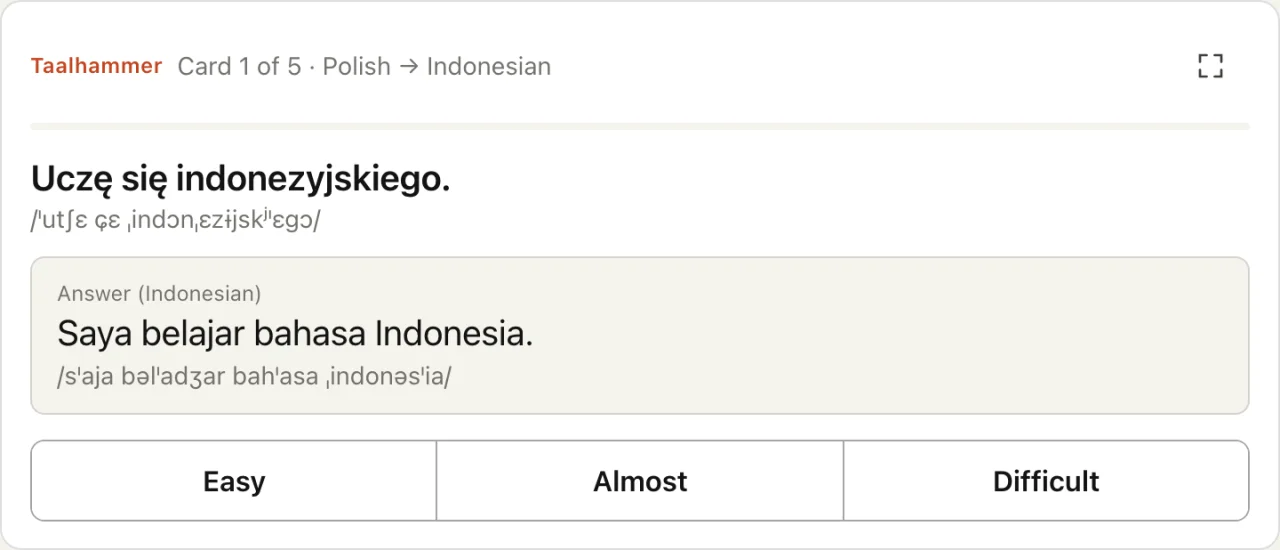
Every card shows the IPA transcription for both sides, so you can check the pronunciation while you review.
See your progress
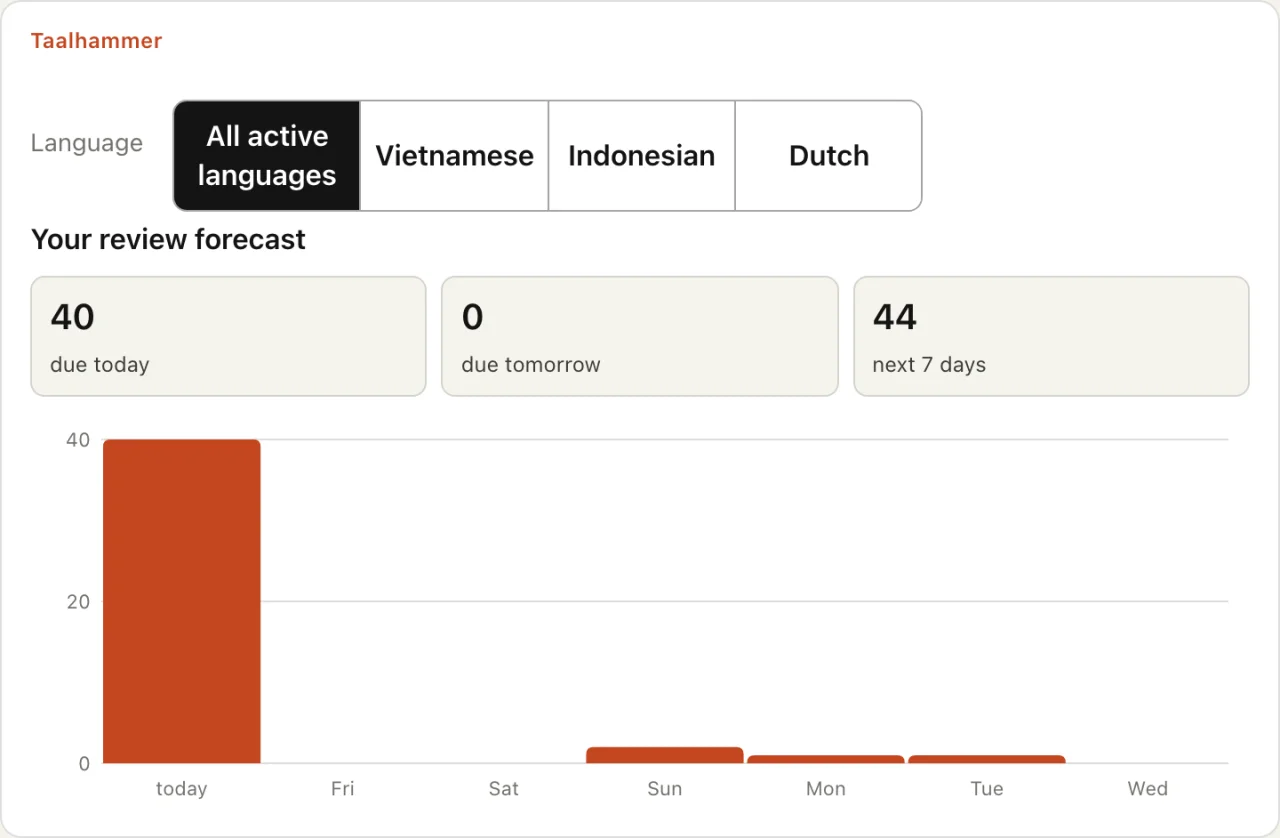
Claude can show your stats, your weakest cards, and a seven-day review forecast per language. The numbers come from your account, not from an estimate in the chat.
Make a collection
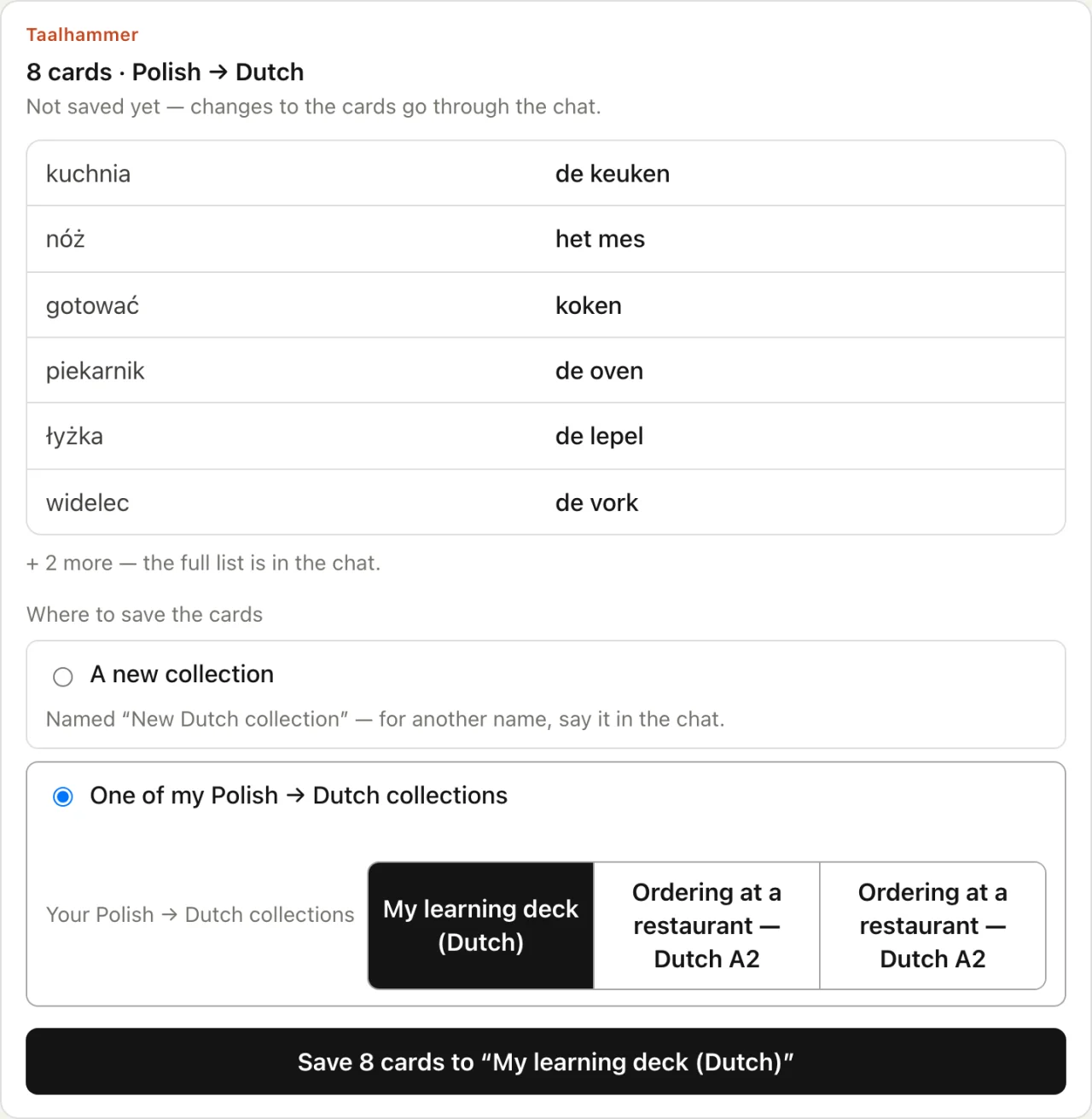
This is where Claude shines. Ask for "12 B1 Italian sentences for a visit to the doctor" and a short form confirms the settings first. Claude then writes the cards following Taalhammer's card rules, which the connector hands over as facts with the form's result.
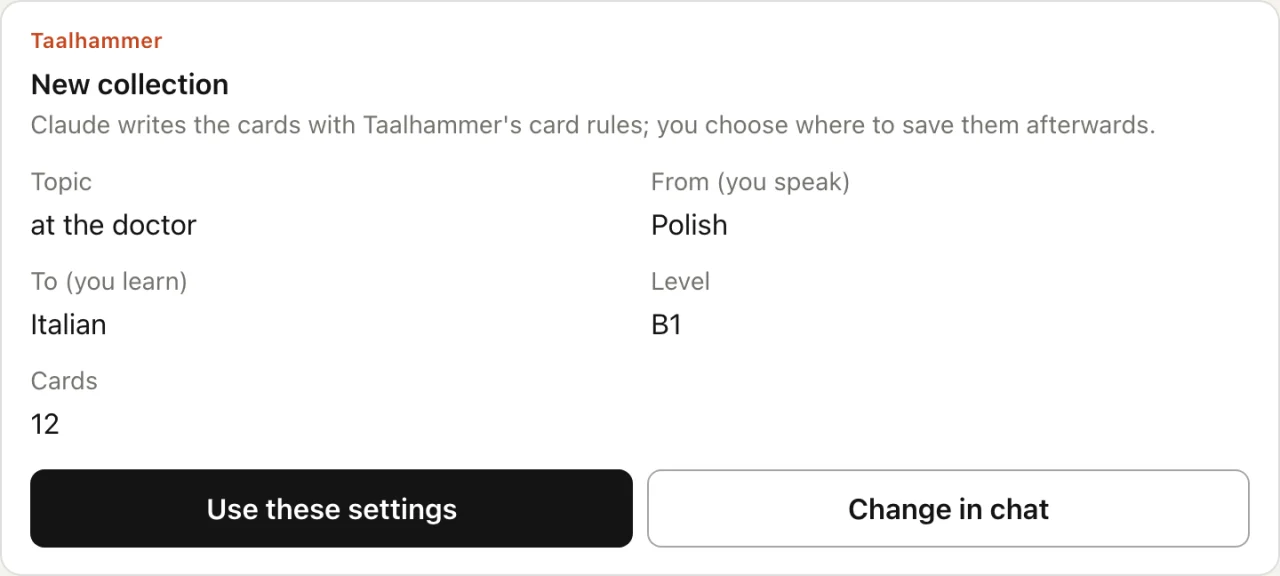
Before anything is saved, you see a preview and choose where the cards go: a new collection or one of your own in the same language pair. A new collection is always private. Once saved, the cards get audio and IPA in the app automatically, like any card you add yourself.
Find courses and listening
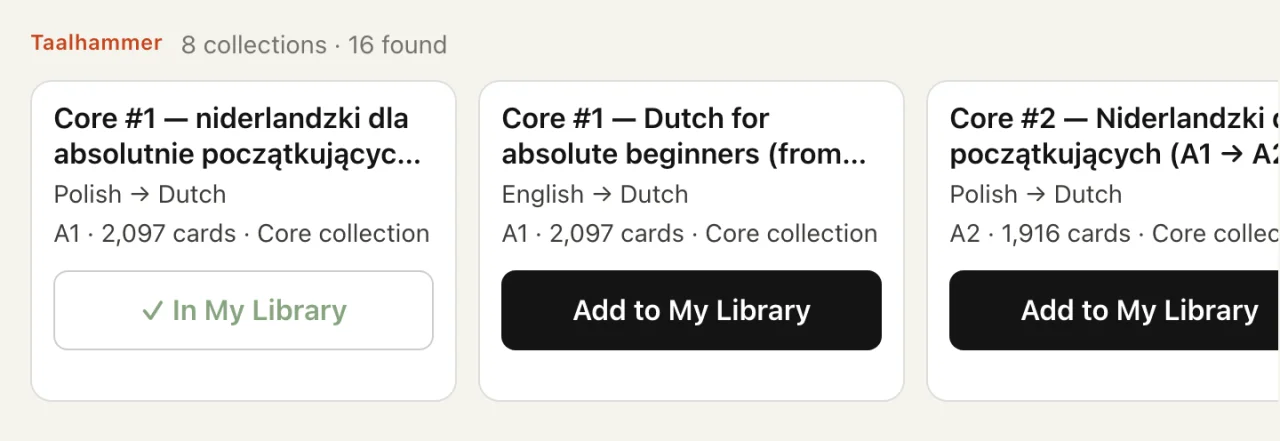
Claude can search our catalog per language pair and add a course to your library, and list radio stations in the language you're learning, each with a link to the station's own website.
What our Claude connector can't do yet
- The knowledge search is slow. Finding passages for one question takes 12–15 seconds, mostly spent by the model that orders them. Everything else answers in under a second.
- Only English and Polish articles. Questions in other languages work, because Claude translates the search phrase, but the passages come back in English.
- Some pages have no twin, so a Polish reader can't be pointed to them.
FAQ
What is an MCP connector?
An MCP connector is a small server that gives an AI assistant tools it doesn't have on its own. Ours gives Claude access to Taalhammer's articles and catalog, and, once you sign in, to your own flashcards and progress.
Does Taalhammer send my questions to an AI provider?
Not through the connector. The connector searches our articles and returns passages; Claude, which you're already talking to, writes the answer.
Can Claude see the answer to my flashcard before I do?
No. Claude gets the prompt, not the answer. The card view shows the answer only when you press Show answer, and in a text-only chat the answer comes back together with your rating.
How is this different from an Anki MCP server?
Most Anki MCP servers connect Claude to Anki on your own computer, through an add-on, so Anki has to be running there. Our Claude connector works with your Taalhammer account on any device: cards, reviews and collections live on our servers, and the cards Claude writes get audio and IPA automatically.
Which assistants does it work with?
Claude (claude.ai, Claude Desktop and Claude Code) and other assistants that support MCP. The interactive views appear in Claude's apps; elsewhere you get the same results as text.